Operation Inputs
For both Compute and Sink operations, inputs serve as the connection points through which data flows in from preceding operations.
Key Characteristics of Inputs
-
Named Inputs:
Each input is identified by a unique name, ensuring clarity and preventing ambiguity in data connections. -
Multiplicity Constraints:
Inputs have constraints defining how many data streams they can accept:- Minimum Multiplicity (>0):
Specifies the least number of data streams required for the operation to function. - Maximum Multiplicity:
Sets the upper limit on the number of data streams the input can handle.- A value of
1restricts the input to a single source. - Higher values or infinity (
∞) allow multiple sources.
- A value of
- Minimum Multiplicity (>0):
Accessing inputs
Your interface script (for example, stage2_interface.py) receives a JSON payload containing:
- inputs — files and data connected to input ports
- parameters — configured operation parameters
- outputs — output configuration information
The script parses this JSON to access the data produced by previous processes.
Input Structure
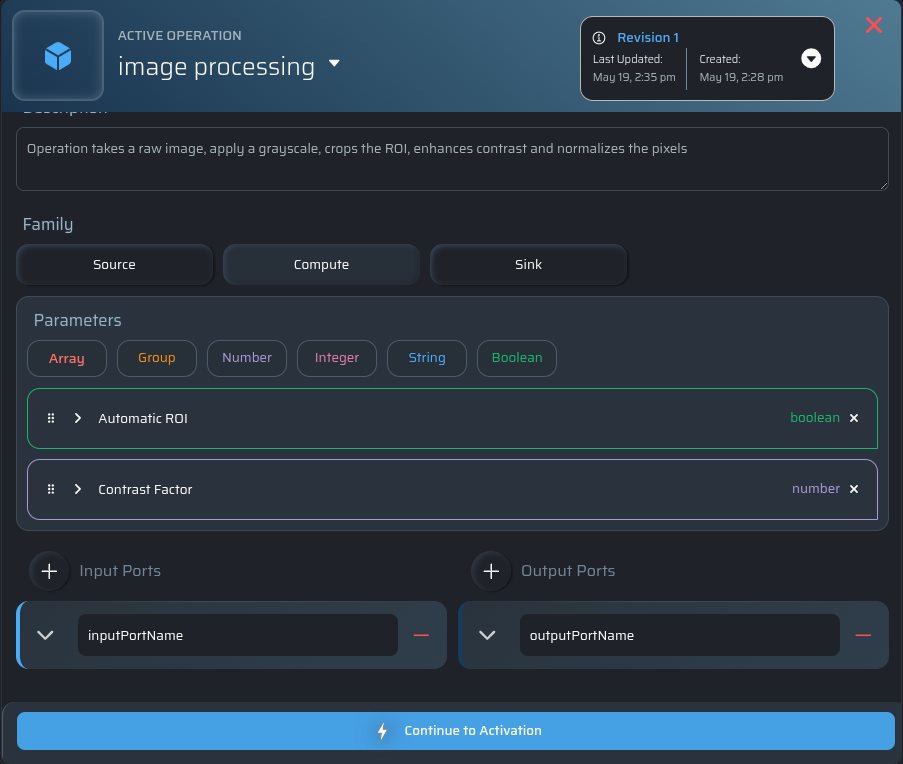
Inside the parsed JSON payload, the inputs object contains all ports created for the operation.
Each port name maps to an array of connected input files:
{
  "context": {}
  "inputs": {
    "inputPortName": [
      "/stage2/inputs/inputPortName/file1.png",
      "/stage2/inputs/inputPortName/file2.png",
      "/stage2/inputs/inputPortName/file3.png"
    ] // 3 sources connected to 1 port
  },
  "outputs":{},
  "parameters": {}
}
In this example:
inputPortNameis the name of the input port- The array contains all files connected to that port
- Three sources are connected to a single input port (
3:1multiplicity)
Example: Reading Inputs in Python
import json
import argparse
import sys


def main():
    parser = argparse.ArgumentParser()

    # JSON payload passed to the interface script
    parser.add_argument(
      "stage2_input",
      help="JSON string with inputs, parameters, and output path.",
    )

    args = parser.parse_args()

    # ~~~~~~~~~~~~~~~~~~~~~~~~~~~~~~~~~~~~~~~~~~~~~
    # Parse the JSON input
    # ~~~~~~~~~~~~~~~~~~~~~~~~~~~~~~~~~~~~~~~~~~~~~
    try:
        stage2_arguments = json.loads(args.stage2_input)
    except json.JSONDecodeError as e:
        print(f"Error parsing JSON input: {e}")
        sys.exit(1)

    # ~~~~~~~~~~~~~~~~~~~~~~~~~~~~~~~~~~~~~~~~~~~~~
    # Extract inputs
    # ~~~~~~~~~~~~~~~~~~~~~~~~~~~~~~~~~~~~~~~~~~~~~
    inputs = stage2_arguments.get("inputs", {})

    # Get all files connected to the "inputPortName" port
    input_files = inputs.get("inputPortName", [])

    print(input_files)

    # Example: accessing individual files
    if len(input_files) >= 3:
        input_file1 = input_files[0]
        input_file2 = input_files[1]
        input_file3 = input_files[2]

        print(input_file1)
        print(input_file2)
        print(input_file3)


if __name__ == "__main__":
    main()
Notes
- Every input port is represented as an array, even if only one file is connected.
- Use
inputs.get("<portName>", [])to safely access a port. - Always validate the number of connected files before accessing array indices.
Importance of Input Rules
These rules ensure that operations receive the appropriate amount and type of data, preventing invalid or incomplete configurations in workflows.